


Word Chums
4.643.66K Reviews
App Specs
- Version
- 2.18.0
- Updated On
- License
- Free
- Downloads
- 1,000,000+
- Developer
- PeopleFun
- Categories
- Word
- Platform
- Android
Screenshots

 Analysis by AppCompare
When I want a word game that gives me something to consider between turns, I’m drawn to the board-based format of Word Chums. I can spend a move weighing a promising word against the letters I’d rather save, then leave the game and return when I have another quiet moment. That stop-and-start rhythm is a big part of its appeal: it suits a coffee break or a low-key match with a friend better than a game that demands my full attention for a long stretch.
A good fit for unhurried word play
This is a free word game from PeopleFun, rated for Everyone, and it has been around since its release on July 30, 2013. Its familiar board-game foundation makes it easy to approach if you already enjoy making words from a limited set of letters. The added characters and match elements give it a lighter, more playful feel than a bare crossword or a solo word-search puzzle.
I’d recommend it most to players who enjoy having an opponent to think about. A move is not only a chance to score; it can also change which parts of the board are available next. If I’m playing casually, I can focus on finding a good word. If I’m feeling more competitive, I can consider whether a smaller move leaves a better opening for my next turn. That extra decision-making gives the familiar word-making action some staying power.
It is less suited to someone who wants a quick puzzle with a definite finish in a few minutes. A board match can unfold at a pace shaped by the other player, so it may not deliver the immediate completion and reset of a daily word puzzle or a short solo challenge. I would choose one of those alternatives if I wanted a self-contained task rather than an ongoing game.
Making each turn count
My most useful habit is to check the whole board before committing to the first acceptable word I spot. A word that looks impressive in isolation may be less appealing if it gives the opponent a convenient place to build. I also try not to treat every awkward set of letters as a problem to solve at once: sometimes the practical move is the one that makes progress while keeping future options open.
This is where the game’s board format feels different from a word search. In a word search, I scan for answers that are already hidden in a grid; here, I create words and have to think about the shared play space. Compared with a solo anagram game, there is another person’s next move to account for. That makes the experience more social and strategic, but it also means a match can feel less predictable than a puzzle with a fixed answer.
For an everyday example, I can start a game during a short wait, make a move, and put my phone away rather than trying to finish the whole match on the spot. When I come back, I have a new board situation to assess instead of repeating the same opening. That small change in context helps the game fit around errands or a lunch break, though it works best when I’m comfortable letting a match take its time.
Worth Reading Before You Choose

EA SPORTS FC Mobile 26 Is a Bigger Football Game, but It Takes Time

Flipboard Shows What News Apps Must Do Beyond the Feed

Switching to Android Auto Means Rethinking Your Driving Routine

Google Calendar Makes a Crowded Week Easier to Manage

Ludo King Makes the Most of the Minutes Between Plans

Baby Panda World Brings Quick Play to Modern Phones, but Its Game Library Feels Busy
Playing through the word-game loop
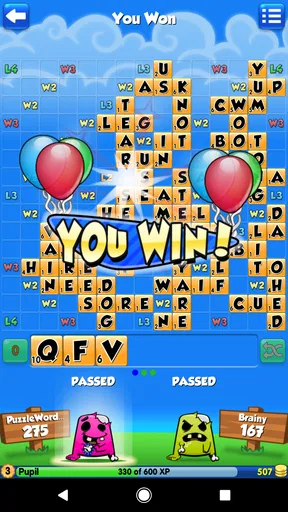
The basic rhythm is easy to understand: choose letters, form a word on the board, see how the move changes the position, and decide what to do next. The feedback comes from both the result of my play and the state of the shared board. A strong turn feels satisfying, but it also prompts a fresh question: did I improve my position, or leave the other player an opportunity?
Getting Started with Word Chums
First things first, downloading Word Chums is a breeze. It’s available on both Android and iOS, so no matter what device you’re rocking, you’re covered. Once installed, you’re greeted with a vibrant and welcoming interface. The colors are bright without being overwhelming, and the cute chum characters add a playful touch that sets the mood perfectly.
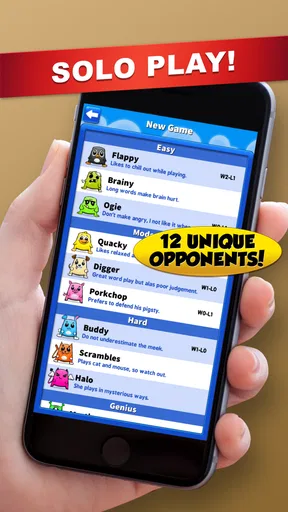
Setting up an account is straightforward. You can choose to connect via social media or create a standalone account. I found linking it to Facebook quite handy as it allows for easy game invites to your friends. If you're someone who loves to compete, this is where the fun begins. You can challenge your buddies or match up with random players from around the globe.
The Gameplay Experience
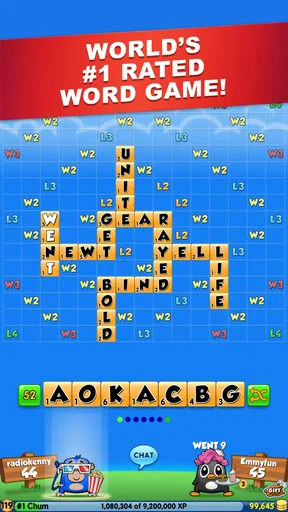
The core of Word Chums is similar to classic word games where you form words on a board to score points. However, what makes it stand out is the added element of character leveling and power-ups. Each successful game earns you experience points, which help you level up your chum characters. This adds a layer of strategy beyond just forming words.
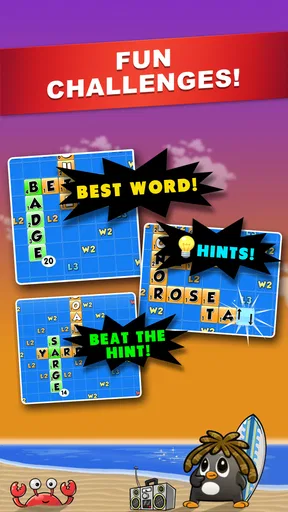
Word Chums also offers a variety of power-ups that can be used strategically. Whether it's a "hint" to get you out of a tight spot or "bombs" to clear tiles, these tools add an exciting twist to the gameplay. Personally, I’ve found them incredibly useful during challenging matches.
Visuals and Sound
One thing that sets Word Chums apart is its delightful visual appeal. The graphics are crisp, and the animations are smooth, making every game session visually entertaining. The chum characters are quirky and customizable, which adds a personal touch to the game. You can earn or buy accessories to dress up your chums, making them uniquely yours.
The sound design complements the visuals perfectly. The background music is light and cheerful, creating a relaxing atmosphere. Sound effects are subtle and not distracting, which is a big plus when you’re deep in thought trying to come up with that high-scoring word.
Community and Social Interaction
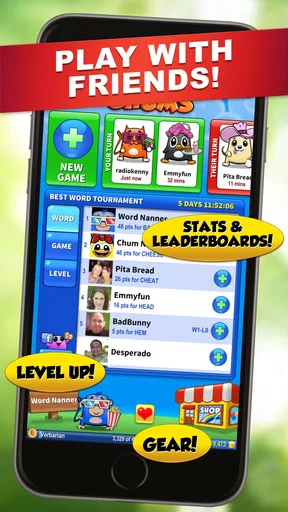
One of the highlights of Word Chums is its strong social component. The app encourages interaction with its built-in chat feature, allowing you to communicate with opponents. It's a great way to make new friends or engage in some friendly banter. There are also leaderboards and weekly competitions, which add a competitive edge to the game. Climbing the ranks is immensely satisfying and keeps you coming back for more.
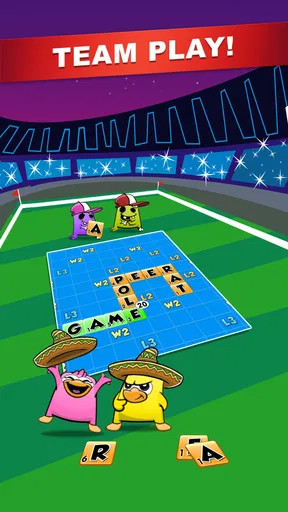
Additionally, the game offers team play, where you can join or create teams to compete in group challenges. This aspect fosters a sense of community and teamwork, making the game even more engaging.
Progress, spending, and practical trade-offs
Character progression and power-ups give a match more texture than simply placing one word after another. I’d treat those extras as ways to add variety, not as a reason to spend. The game is free to download, with optional in-app purchases ranging from $0.99 to $49.99 per item. If I’m trying it for the word play, I can begin without paying; I’d only consider a purchase if I already knew I valued the extra items enough to justify the cost.
A useful approach is to pause before using a helpful tool just because a turn feels difficult. I’d first look for a different word or a safer placement, then use an aid when it genuinely helps me continue enjoying the match. That keeps the core satisfaction—finding and placing words—at the center. Players who dislike optional purchases or prefer every advantage to come strictly from vocabulary may find the extras distracting, even if they choose not to buy anything.
The game has an average rating of 4.6 from around 151,000 ratings, and it has been installed over a million times. Those figures suggest that many players have found an audience for its mix of board play and social competition, but they don’t guarantee that its pace will suit everyone. I’d pay more attention to whether I enjoy asynchronous turns and an opponent-driven board than to popularity alone.
Is It Worth Your Time?
In my honest opinion, Word Chums is a gem for anyone who loves word games. It’s not just about forming words; it’s about strategy, competition, and having a blast with friends. The app does a fantastic job of balancing challenging puzzles with fun and entertainment. Plus, the vibrant graphics and character customization add a layer of charm that’s hard to resist.
If you’re looking for a word game that offers more than just the usual fare, I’d say give Word Chums a shot. Whether you’re a casual player or a hardcore word nerd, there’s something here for everyone. So, grab your phone, download the app, and get ready to chum up with words!
Who should keep it in rotation?
I’d keep it installed if I like friendly competition, enjoy thinking about letter choices, and don’t mind a match unfolding over time. It can make a familiar word-game routine feel more personal because I’m responding to another player rather than solving a board alone. The character progression and customization add a lighter reward alongside the satisfaction of a well-placed word, while the social options give me a reason to return to a match with friends.
I’d skip it if I want a strictly solo experience, dislike waiting on another player, or prefer a brief puzzle with a clear end after each attempt. A conventional word search is a better fit when I want to scan and finish without strategy; a quick anagram challenge is better when I want rapid rounds. For players who do enjoy the slower back-and-forth, Word Chums offers a distinct reason to start another session: the board has changed, the opponent has responded, and I get another chance to make a clever move.
Pros
- Engaging multiplayer options.
- Colorful and fun interface.
- Educational word challenges.
- Easy to learn for all ages.
- Frequent updates and new content.
Cons
- In-app purchases can be pricey.
- Ads can be intrusive at times.
- Requires constant internet connection.
- Limited offline features.
- Notifications can be overwhelming.
FAQs for Word Chums
What is Word Chums and how does it differ from other word games?
Word Chums is a highly interactive and engaging word game that combines the classic challenge of word puzzles with vibrant graphics and a social element. Unlike other word games, Word Chums offers unique features such as character customization, detailed stats to track your progress, and the ability to play against friends or random opponents. Its lively animations and sound effects make it stand out in the word game genre.
Is Word Chums free to play, and are there in-app purchases?
Word Chums is free to download and play, offering a complete gaming experience without any initial cost. However, the game includes optional in-app purchases that can enhance the gameplay. These purchases may include additional coins, hints, or special character accessories, allowing players to customize their experience further. Players can enjoy the full game without spending money, but purchases can offer convenience and personalization.
Can I play Word Chums offline, or is an internet connection required?
Word Chums primarily requires an internet connection to function, especially for multiplayer features and social interactions. However, there are some aspects of the game that can be enjoyed offline, such as solo challenges or practice modes. For the best experience and access to all features, a stable internet connection is recommended.
How does Word Chums ensure fair play and prevent cheating?
Word Chums employs several mechanisms to ensure fair play and prevent cheating. The game uses a robust dictionary and word validation system to maintain integrity. Additionally, it monitors gameplay patterns for suspicious behavior and employs algorithms to detect and prevent cheating. Players can enjoy a fair and balanced gaming environment, competing based on skill and strategy.
What accessibility features does Word Chums offer for players with disabilities?
Word Chums is designed with accessibility in mind, offering features that accommodate players with disabilities. The game includes adjustable text sizes, colorblind-friendly options, and intuitive controls. Additionally, audio cues and voice-over support help players with visual impairments. These features ensure that everyone can enjoy the game, regardless of their physical abilities.


